 AI with Breakfast
Building with AI Before Breakfast: Phonetic Alphabet Game
 Lee
LeeBuilt in this post
Phonetic Alphabet Game
Web
Today I am carrying on from last weeks theme of multi-cultural living, today I am building a tiny tool that solves a surprisingly awkward problem: spelling things out when you can’t afford to get a single character wrong. Email addresses. Booking references. Names. Anything where one misheard letter turns into a five-minute loop of “no, not that one”.

This happened to me recently while booking tickets. I had to give my email address over the phone and it just would not land. I’d say a letter, it would be heard as something else, I’d correct it, and then the correction would be heard as something else too. The obvious fix is the phonetic alphabet, but the moment you need it is the moment your brain decides it has forgotten all of it. I was sat there thinking: is “H” Hotel… or Kilo… or have I made that up?
So I built a converter.
It’s called Alphabet and it lives at alphabet.leemallon.com.
The idea
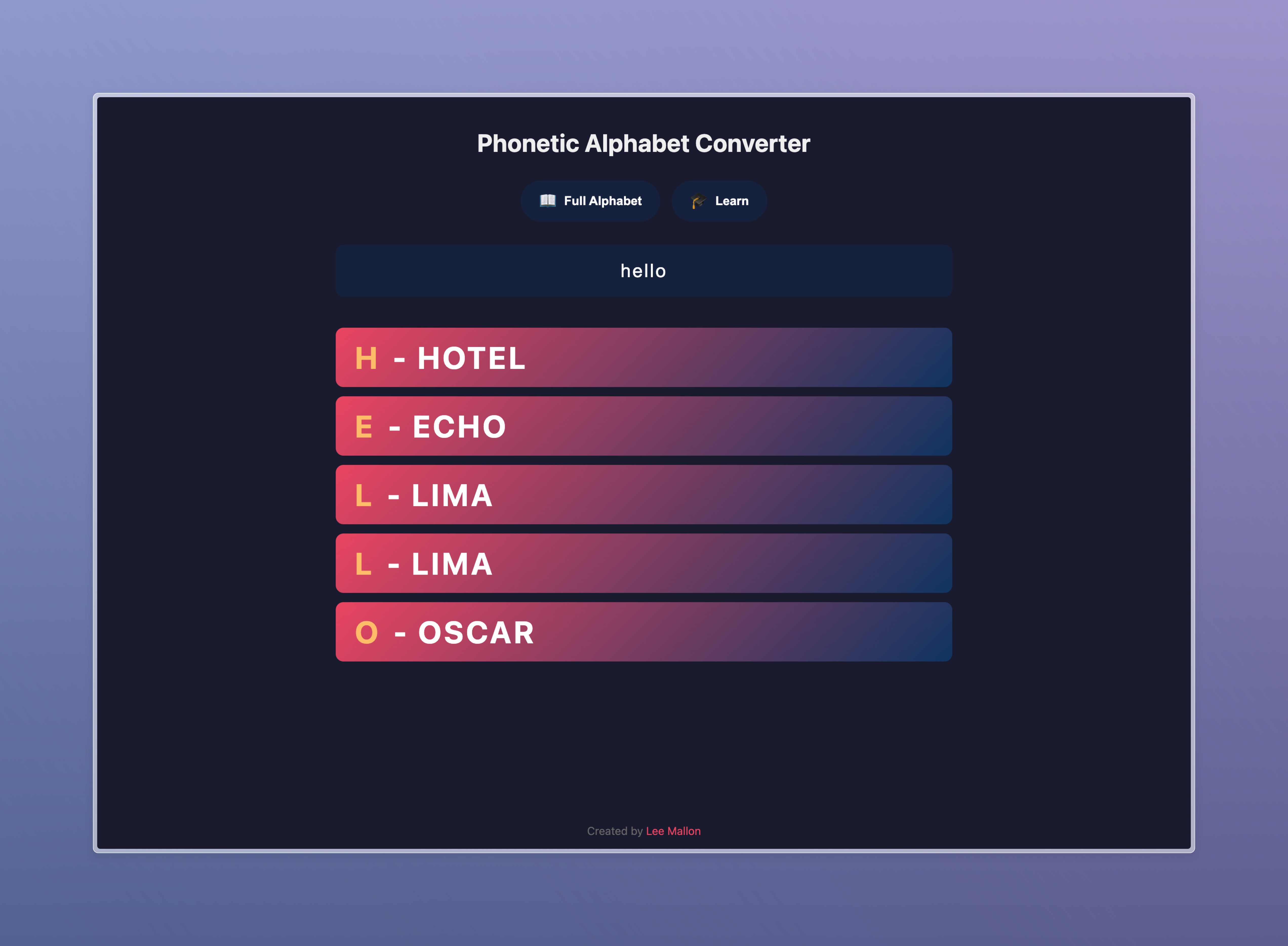
I wanted a website where I can type something short, usually under 50 characters, and it immediately spells it out underneath using the phonetic alphabet in big, bold text. No friction. No fuss. Just clarity. The kind of thing you can open on your phone while you’re in the middle of a call.
That is the entire point.
Here’s the prompt that started it all.
Prompt (converter)
“So basically I want a website where I can type in something. It’ll be quite short, maybe less than 50 characters. is normally like an email address or something and I want underneath to basically spell out the, the like, you know, the army alphabet like Alpha, Beta, Charlie, Gamma, Hotel, Yankee, that type of stuff. Quite big, quite bold.”
It worked immediately, which is the best kind of build. I ended up adding it to my phone’s home screen because this is one of those tools you only open when you need it right now.
The moment it got more interesting
After showing it to my kids I noticed something. The tool fixed the immediate problem, but it didn’t fix the underlying one.
I still didn’t actually know the phonetic alphabet.

The converter is great when you’re under pressure, but it’s also a perfect place to learn. If I’m already opening the tool, why not use that moment to get better so I don’t have to rely on it forever?
So I extended the prompt and asked for a game mode.
The game
The site had an icon in the bottom right. I asked for that to become a simple switch with two options. One shows the converter. The other loads a learn mode, something fun and engaging that lets me practice quickly.

Here’s the prompt.
Prompt (game mode)
“This is really good. What would be great is if I could actually get better at learning the phonetic alphabet as well. So can and where you’ve added the icon in the bottom right hand corner, can that have like two options? one to show the alphabet and another one to which is called learn or game and that then loads a game to enable me to practice the alphabet in a fun and engaging and interesting way.”
That produced the learning mode, and you can play it at alphabet.leemallon.com.
Now the tool does two jobs. It helps me spell things correctly when I’m in the moment, and it helps me improve when I’m not. One minute of practice here and there is enough to make the next phone call noticeably less painful.
Sometimes the best builds are the small ones. The ones that remove real friction from real life, and then quietly make you better while they’re at it.
Have a great day.
Built in this post
Phonetic Alphabet Game
Web