 AI with Breakfast
Building with AI Before Breakfast: Working across timezones becomes easier to arrange
 Lee
LeeBuilt in this post
Working Across Timezones
Web
So. I’m writing this while enjoying a little bit of sun at the beach and I must say I am very glad for the anti-glare screen on my macbook.
Today I have a load of meetings across UAE, UK and USA timezones and now begins the timezone meeting planning but not for long.
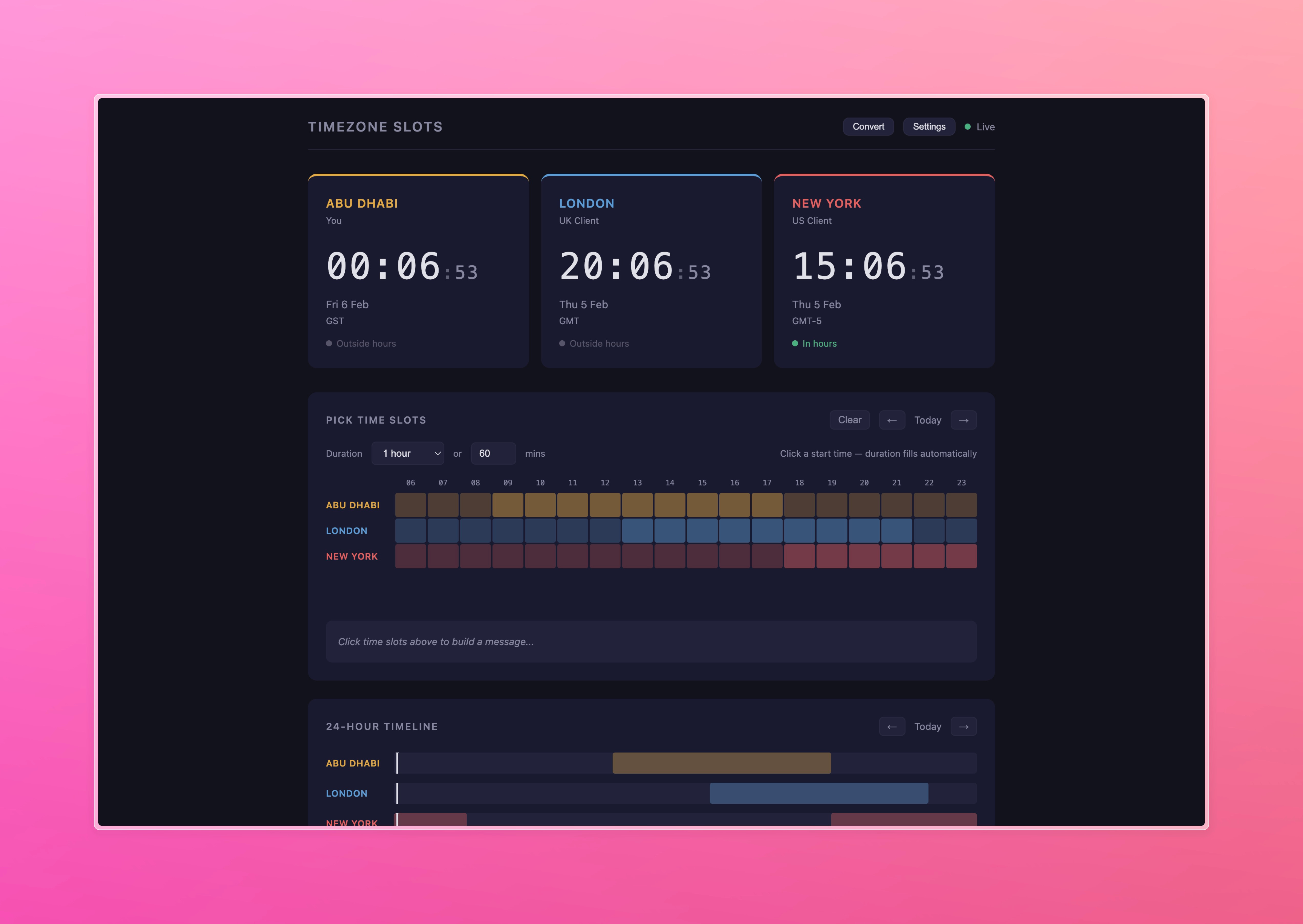
I give you TimeSlots https://timezones.leemallon.com

The Three-Timezone Tango
Here’s the thing about working across the Middle East, Europe, and North America: you’re constantly doing mental arithmetic. Abu Dhabi is GMT+4. London is GMT, except when it’s BST, except when the clocks change and for two weeks you can’t remember if it’s four hours ahead or three. New York is EST, except when it’s EDT. And don’t even get me started on that brief window when the US changes clocks but the UK hasn’t yet.
I work with clients across all of these. It’s brilliant - genuinely, the ability to run a business from Abu Dhabi that serves clients in London and New York is very cool. But trying to arrange a call across possibly four timezones? That’s where it stops feeling like the future and starts feeling like a maths exam.
The Tools That Almost Work
Google Calendar lets you add a secondary timezone. Two zones. That’s it. So you can see Dubai and London side by side, but New York? You’re on your own. Open a new tab, google “time in New York,” do the mental subtraction, hope you haven’t confused EST with EDT, and pray you don’t accidentally book a 5am call for someone.
There are timezone tools out there. World Time Buddy, Every Time Zone, Time.is - they all exist, and they’re all fine. Perfectly serviceable. Built for everyone, which means built for no one in particular.
And that’s the point. This isn’t about building a better timezone tool. There are plenty of those. This is about something more interesting: Personalised Software on Demand - or as I’ve been calling it, PSOD.
PSOD: Software That Fits Like a Tailored Suit
Think about it this way. You can go to a shop and buy a suit off the rack. It’ll fit, more or less. The arms might be a bit long, the shoulders a bit wide, but it does the job. That’s World Time Buddy. That’s Every Time Zone. Perfectly adequate rack suits.
But what if you could have a suit cut exactly to your measurements, with the pockets where you actually want them, in exactly the fabric you like, ready in about an hour? And what if it cost you nothing but a bit of time explaining what you wanted?
That’s what we’re living through right now. The cost of creating personalised software has collapsed. The tools I used to build Timezone Slots - Claude, a single HTML file, and about a morning’s worth of conversation - would have required a developer, a designer, a brief, a sprint, and a budget not that long ago.
Now? I described exactly what I needed over breakfast and had it running before lunch.
I don’t need a timezone tool that handles every edge case for every person in every country. I need one that knows I’m in Abu Dhabi, that I work with clients in London and New York, that my working hours are 9 to 6, and that I want to find a meeting slot where everyone’s awake and at their desk. That’s it. Software built for an audience of one.
What Timezone Slots Actually Does
The app has three main areas, and each one solves a specific part of my “what time is it everywhere” problem.

The Live Clocks
At the top, three cards. Abu Dhabi, London, New York - or whatever cities you configure. Each one shows the current time, updating every second with a gentle pulse so you know it’s alive. Below the time, a simple status: green dot and “In hours” if they’re within working hours, grey dot and “Outside hours” if they’re not.
Glanceable. That’s the word. You look at your screen, you know instantly whether it’s a reasonable time to ping someone. No googling, no mental maths, no accidentally Slacking your New York client at 4am.
The Time Slot Picker
This is where it gets properly useful. An interactive grid showing hours across all your cities, colour-coded by working hours. Click on a slot, set a duration - 15 minutes, 30, an hour, whatever - and it instantly generates a message you can copy:
How about:
today (60 min): 14:00–15:00 Abu Dhabi (GST) / 10:00–11:00 London (GMT) / 05:00–06:00 New York (EST)
Paste that into a WhatsApp, an email, a Slack message. Done. No more “let me check what time that would be for you” back-and-forth. The hover states even show you the conversion across all cities as you move your mouse, so you can visually scan for that golden window where everyone’s bars overlap. An ideal enhancement here would be too see this information across all my calendars but this unified view isn’t possible yet due
The 24-Hour Timeline
A horizontal bar for each city, all aligned, with working hours shaded in each city’s accent colour. A vertical “now” marker moves across in real time. You can navigate forward and back by day.
This is the view that makes multi-timezone work click. You can literally see the overlap. That window where Dubai’s afternoon meets London’s morning meets the edge of New York’s start of day - it’s right there, visually obvious. No spreadsheets, no counting on fingers.
Quick Convert
Up in the header, a “Convert” button opens a modal. Pick a time, pick a city, and instantly see what that time is everywhere else - with working-hours status badges. Dead simple. “If it’s 3pm in Dubai, what time is it in New York?” answered in one click.

The Settings: Your Tool, Your Way
Everything is configurable. City names, role labels (”You,” “UK Client,” “US Client”), timezones from a searchable dropdown of every IANA timezone, working hours per city, accent colours. You can add more cities, remove ones you don’t need, switch between 12-hour and 24-hour format.
And here’s the key part: it all lives in your browser. localStorage. No accounts, no servers, no sign-ups, no data leaving your machine. You set it up once and it remembers everything. Open the page tomorrow, next week, next month - your configuration is right there. Close the tab, reopen it, your cities and colours and working hours are exactly as you left them.
There’s something refreshing about that in 2026. No cloud sync. No subscription. No “we’d like to send you notifications.” Just a page that does what you need and remembers how you like it.
The Real Story Here
Look, I could have kept using World Time Buddy. I could have kept doing the mental arithmetic or keeping a sticky note on my monitor with timezone offsets. It would have been fine.
But “fine” is what we’ve been settling for with software for decades. We use tools built for millions of people because the cost of building something just for ourselves was prohibitive. That cost has now fallen through the floor.
Timezone Slots is a single HTML file. No frameworks, no dependencies, no build step, no backend. Vanilla JavaScript using the browser’s built-in Intl.DateTimeFormat API for timezone handling - which, by the way, automatically handles daylight saving transitions, something I definitely don’t want to be thinking about manually.
The whole thing took a morning. One file. Zero dependencies. Deployed by dropping it on a web server. And it does exactly what I need, nothing more, nothing less.
That’s PSOD. That’s the shift. We’ve gone from “use what exists and work around the gaps” to “describe what you want and have it built.” Not for every problem - you’re not going to build your own Figma over breakfast. But for these sharp, specific, personal workflow tools? The ones that save you five minutes twenty times a week? The economics have completely changed.
https://timezones.leemallon.com
Thanks for reading AI with Breakfast! Subscribe for free to receive new posts and support my work.
Built in this post
Working Across Timezones
Web